Nati Cohen

01 / CASE STUDY

01 / CASE STUDY

Quork. Find the right place to work, faster.

Quork. Find the right place to work, faster.

Quork. Find the right place to work, faster.

A location-based discovery platform that helps students, freelancers and remote workers find quiet, productive places to work — and know what to expect before they arrive.

A location-based discovery platform that helps students, freelancers and remote workers find quiet, productive places to work — and know what to expect before they arrive.

See how it works

PRODUCT

Consumer mobile app

AUDIENCE

Students, freelancers & remote workers

PROJECT

Location discovery platform

MY ROLE

Research, UX & UI design

02 / BACKGROUND

The search for a workspace was harder than expected.

The search for a workspace was harder than expected.

The search for a workspace was harder than expected.

Users often need a quiet, comfortable place to study or work, yet existing tools provide incomplete information about what a location is actually like.

As a result, people waste time, arrive at unsuitable places, and repeatedly switch locations before finding one that fits their needs.

THE REAL PROBLEM

Finding a workspace wasn’t the challenge — choosing the right one was.

03 / THE PROBLEM

Every workspace visit was a gamble.

Every workspace visit was a gamble.

Every workspace visit was a gamble.

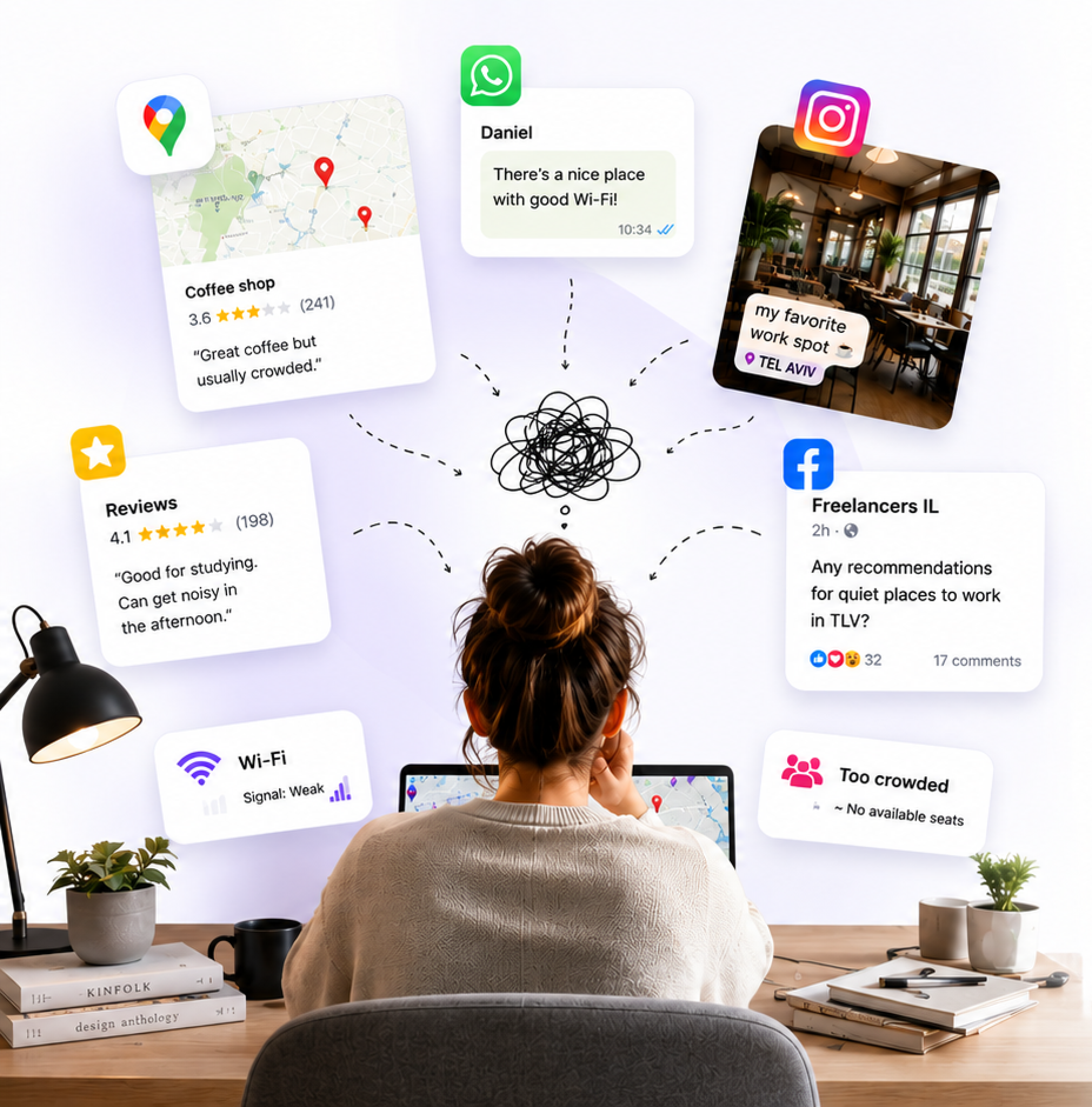
Users often chose cafés, libraries, or coworking spaces without knowing what the actual experience would be like. A highly rated location could still be noisy, overcrowded, lacking power outlets, or unsuitable for focused work.

Without reliable information, people wasted time moving between places instead of being productive.

A person at a laptop surrounded by floating chat messages, review cards and social posts asking for recommendations for quiet places to work

INSIGHT

The problem wasn’t finding places. It was knowing what to expect before arriving.

04 / THE CHALLENGE

Making workspace decisions without information overload.

Making workspace decisions without information overload.

Making workspace decisions without information overload.

Users needed more than a list of nearby places. They wanted reliable information about noise levels, Wi-Fi quality, seating availability, and overall suitability for focused work.

The challenge was presenting all this context in a way that felt fast, intuitive, and easy to scan while on the move.

A sketch mapping information overload — scattered reviews, ratings and chat messages — into one clear workspace card with noise, Wi-Fi, seating and outlet indicators

From information overload to one clear decision

DESIGN PRINCIPLE

Provide enough information to build confidence, without turning the experience into research.

05 / COMPETITOR ANALYSIS

Existing tools weren’t built for finding a workspace.

Existing tools weren’t built for finding a workspace.

Existing tools weren’t built for finding a workspace.

Most users relied on a mix of maps, review platforms and trial and error when searching for a place to work or study.

While each tool solved part of the problem, none provided real-time workspace information such as noise levels, available seating and power outlets in one place.

Feature

Google Maps

Gable

Quork

Location discovery

Great for finding places

Great for discovering

Built for workspaces

Real-time noise levels

Not available

Not available

Live crowd & noise data

Available seating

Not available

Not available

Live seat availability

Power outlet availability

Not available

Not available

Real-time power info

Workspace filters

Limited filters

Limited filters

Advanced filters

Personalized recommendations

Not available

Not available

Personal & relevant

Fully supported

Very limited feature

Not available

06 / USER RESEARCH

Understanding how people choose a workspace.

Understanding how people choose a workspace.

Understanding how people choose a workspace.

To understand the challenges people face when searching for a place to work or study, I ran a survey among students, freelancers and remote workers.

40

Survey respondents

Students, freelancers & remote workers

1

Finding a workspace is a recurring need

38% of participants search for a workspace several times each week.

KEY INSIGHT

Users don’t need more places. They need confidence in their choice.

2

Cafés are the most popular workspace

56% of participants prefer working from cafés and informal spaces.

KEY INSIGHT

The challenge isn’t finding cafés. It’s knowing which one fits their needs.

3

People trust recommendations

Users rely heavily on friends, communities and online reviews before visiting a location.

KEY INSIGHT

Trust reduces uncertainty and drives decisions.

4

Practical information is often missing

The hardest things to verify before arriving were exactly the ones that decide the visit: noise level, seating availability, Wi-Fi quality and power outlets.

KEY INSIGHT

Productivity depends on details users can’t verify in advance.

Pie chart: how often participants look for a workspace — often, several times per week 56.25%, sometimes 31.25%, rarely 12.5%

How often they search

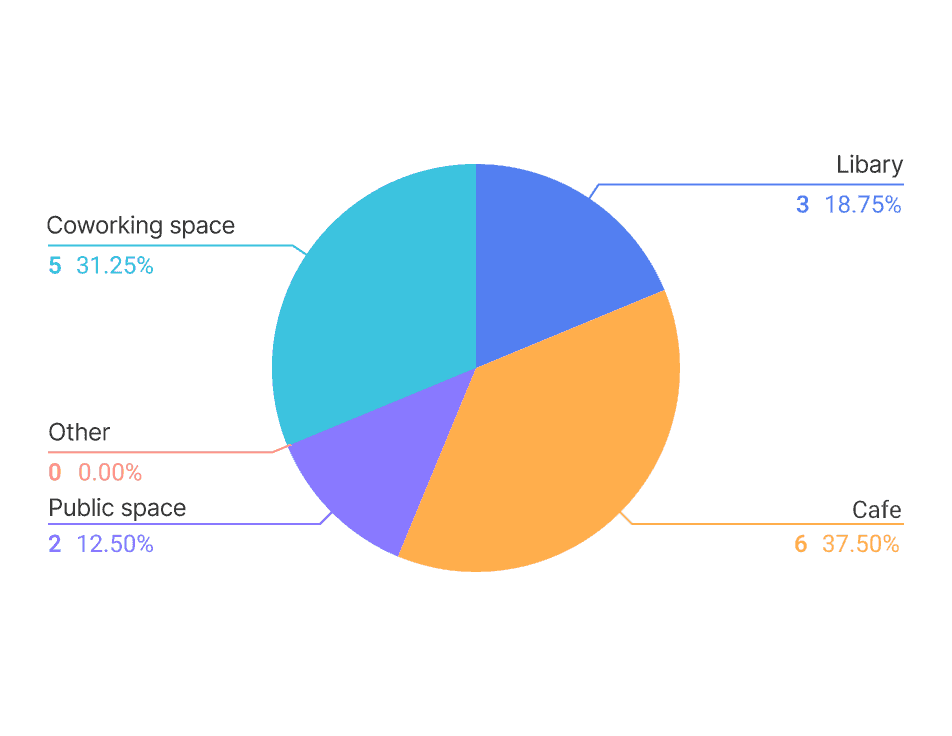
Pie chart: preferred workspace type — café 37.5%, coworking space 31.25%, library 18.75%, public space 12.5%

Where they work

Pie chart: what they trust when choosing a place — friends and family 31.25%, online reviews, communities 18.75%, other 12.5%

Who they trust

RESEARCH CONCLUSIONS

Users need workspace-specific information

Real-time conditions affect productivity and satisfaction far more than a star rating.

Practical details matter more than ratings

Noise, seating, Wi-Fi and outlets decide whether a place actually works.

Recommendations increase trust

People lean on friends and communities to reduce the risk of a wasted trip.

07 / PERSONAS

Different needs, different ways of working.

Different needs, different ways of working.

Different needs, different ways of working.

Not everyone looks for the same workspace experience. Some users need complete silence and focus, while others value flexibility, comfort and reliable amenities.

Through interviews and research, two recurring user types emerged — each with different goals, habits and frustrations. Understanding these differences helped shape Quork into a tool that supports multiple work styles rather than a single ideal workspace.

Eden, a freelance designer

Eden, 27

Freelance designer

“Finding a quiet place to work shouldn’t take longer than the work itself.”

GOALS

Find quiet workspaces quickly

Reliable Wi-Fi and power outlets

Work distraction-free

Discover new productive environments

BEHAVIOR

Works from cafés and coworking spaces

Searches before leaving home

Changes locations frequently

Relies on reviews and recommendations

PAIN POINTS

Unexpected noise

Limited workspace information

No seating availability data

Time wasted moving between locations

Ethan, a computer science student

Ethan, 24

Computer science student

“I need a place where I can focus, not another distraction.”

GOALS

Study efficiently

Find available seating

Stable internet connection

Access charging points

BEHAVIOR

Studies outside home regularly

Uses libraries and cafés

Works for long sessions

Compares several locations before choosing

PAIN POINTS

Full libraries

Unpredictable noise levels

Outdated reviews

Difficult location comparison

08 / USER FLOW

Finding a workspace should feel effortless.

Finding a workspace should feel effortless.

Finding a workspace should feel effortless.

The flow was designed to help users move from a need for focus to a suitable workspace in just a few steps. Filters, live information and detailed workspace profiles reduce uncertainty and help users make confident decisions faster.

Quork user flow diagram: search a location, apply workspace filters, browse results, open workspace details, navigate there and leave a review

09 / USER SCENARIO

A day in Eden’s search.

A day in Eden’s search.

A day in Eden’s search.

Eden is a freelance designer who needs a quiet, reliable place to work. Here’s how she uses Quork to find her ideal workspace — searching, comparing and choosing in just a few simple steps.

01

Opens Quork before leaving home.

02

Searches for nearby workspaces.

03

Applies filters for Wi-Fi, quiet and power outlets.

04

Compares locations using ratings, noise level and photos.

05

Saves her preferred workspace.

06

Navigates directly to the workspace.

07

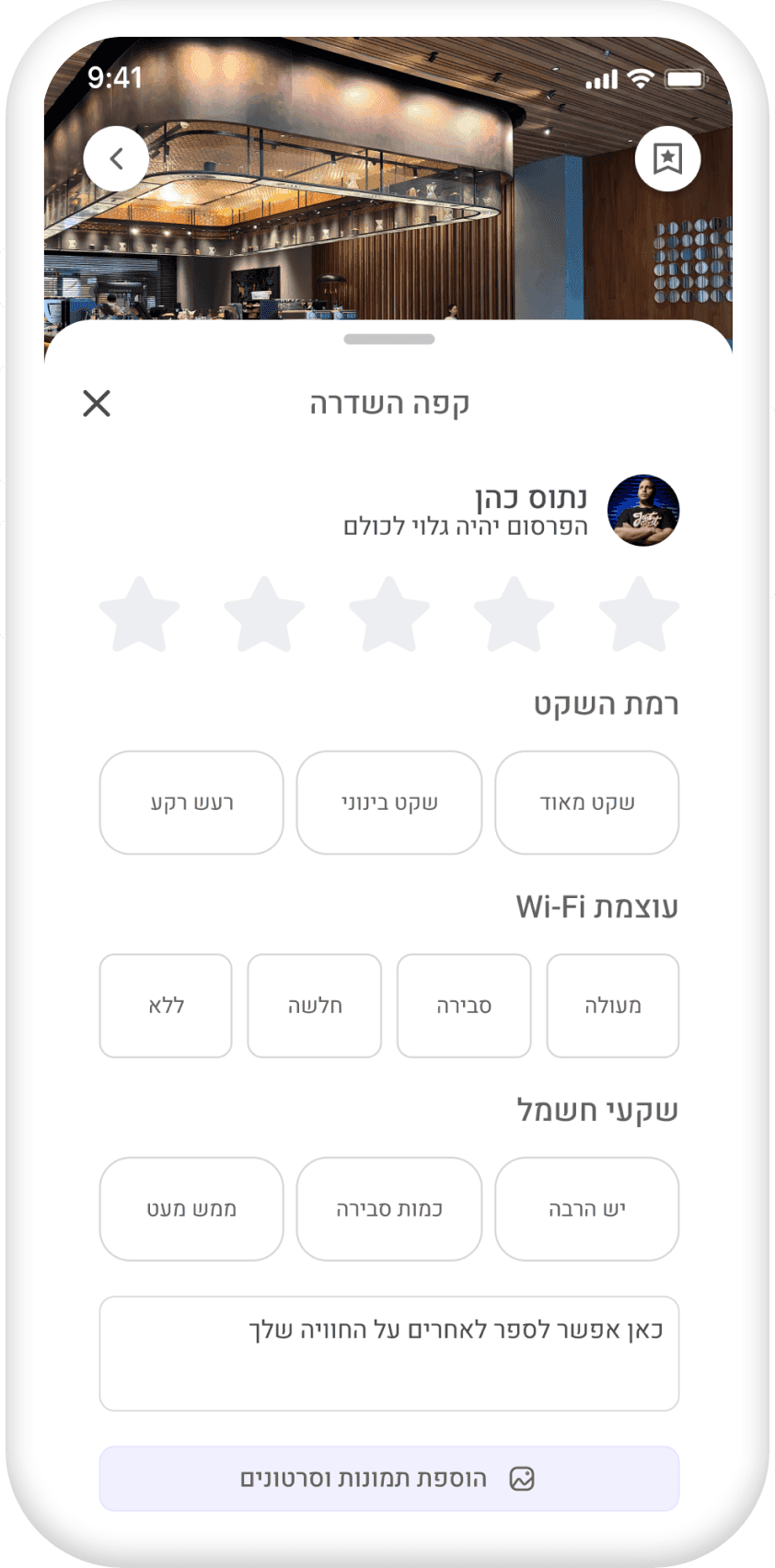
Leaves a review after the session.

10 / LOW-FIDELITY EXPLORATION

From rough sketches to focused workspaces.

From rough sketches to focused workspaces.

From rough sketches to focused workspaces.

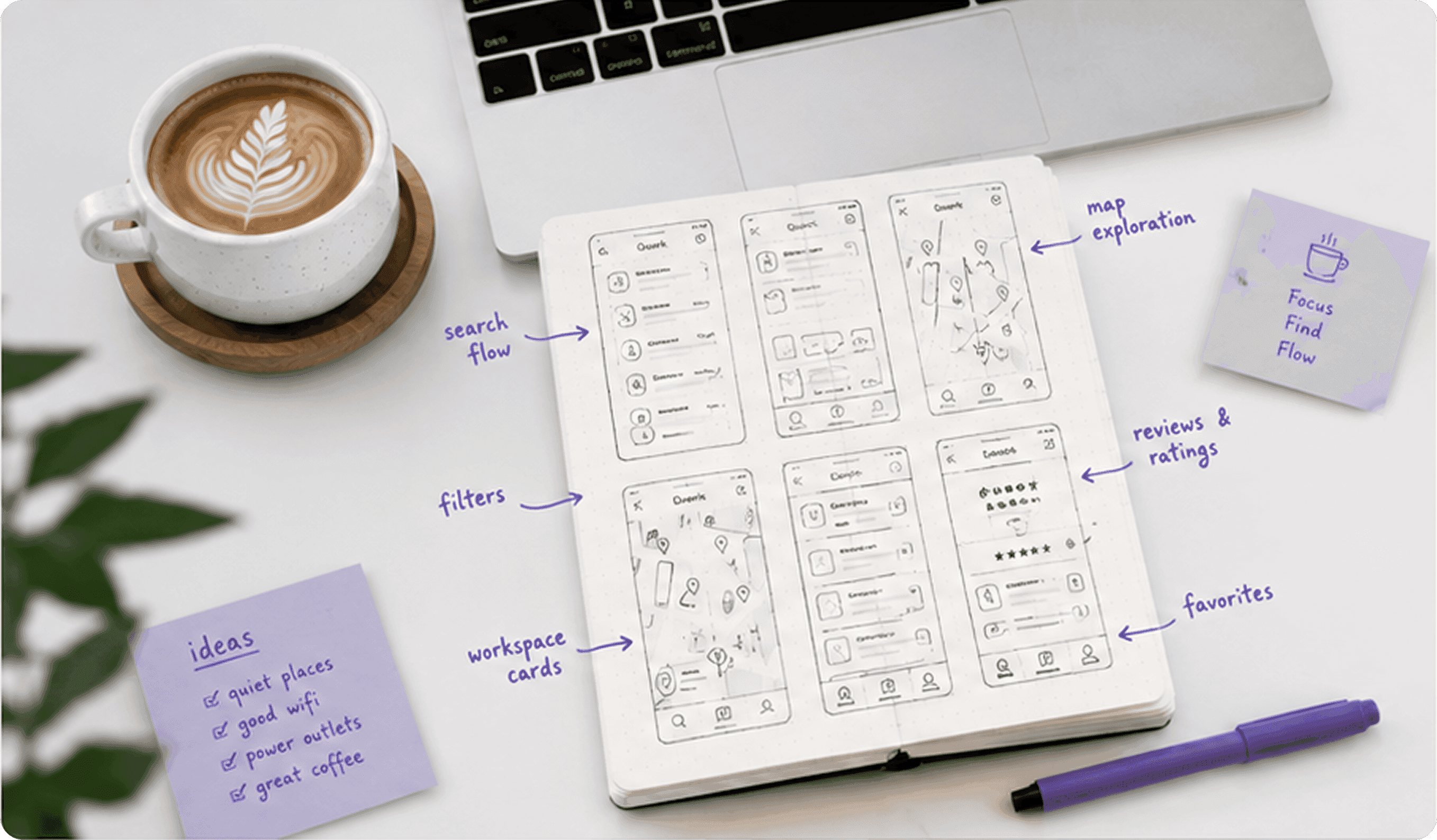
Before designing the final experience, I explored multiple navigation structures, filtering systems and workspace discovery patterns through quick hand-drawn sketches.

This let me test ideas fast, compare different flows, and focus on what truly helps users find the right place without friction.

Early concepts explored

Search & discovery flow

Filtering & sorting options

Reviews & ratings

Favorites & saved places

Map exploration

User journey variations

Hand-drawn Quork sketches on paper: screen layouts, a map view and filter lists, next to a cup of coffee

Sketching the discovery flow by hand

From sketch to wireframe

Wireframe: search and location entry
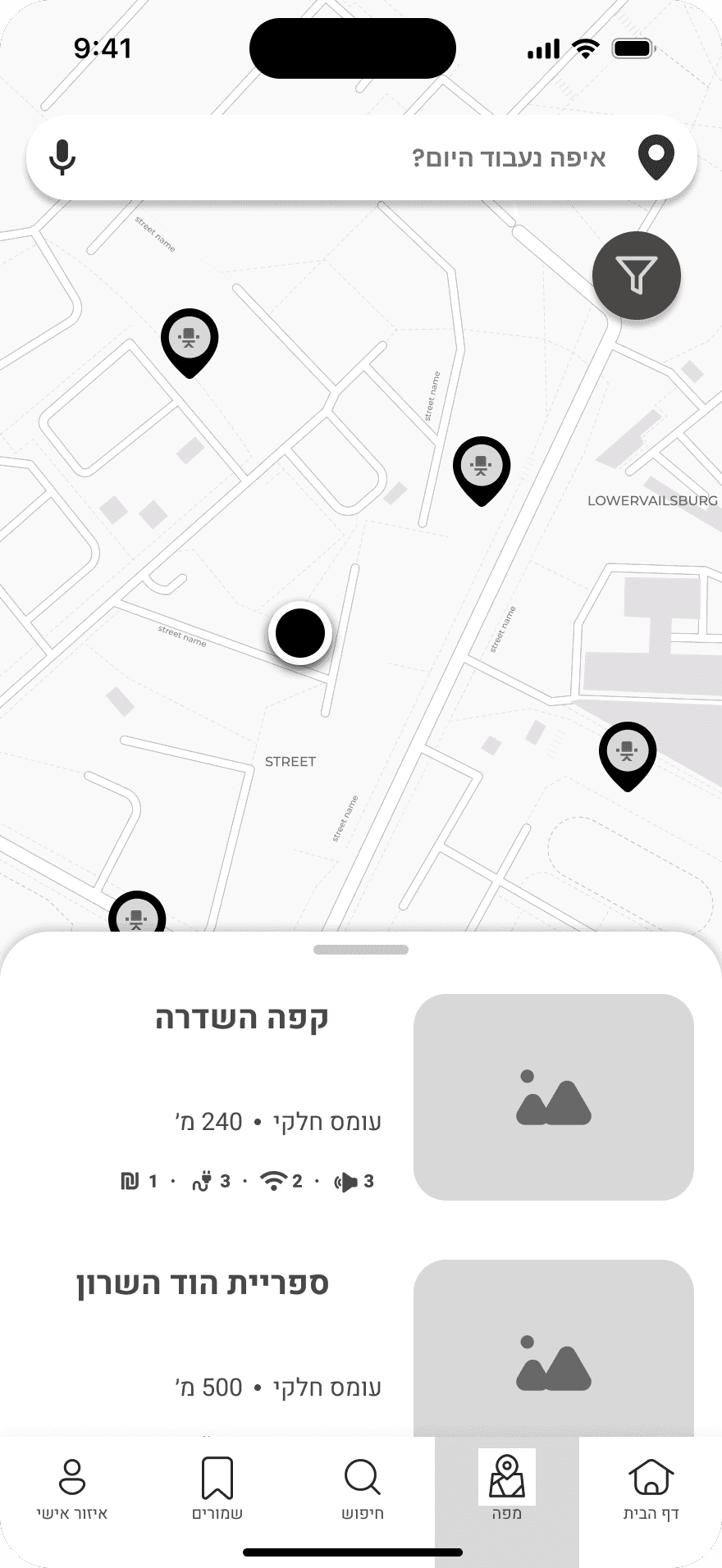
Wireframe: map discovery with pins
Wireframe: workspace results list
Wireframe: workspace profile with details

11 / THE SOLUTION

Finding the right workspace shouldn’t require guesswork.

Finding the right workspace shouldn’t require guesswork.

Finding the right workspace shouldn’t require guesswork.

Quork was designed to remove uncertainty from workspace discovery. Instead of relying on scattered reviews, social recommendations or trial-and-error visits, users can compare, evaluate and choose workspaces based on the factors that matter most to them.

From Wi-Fi quality and noise levels to power outlets, pricing and amenities, every detail is organized in one place — helping users decide faster, and more confidently, before leaving home.

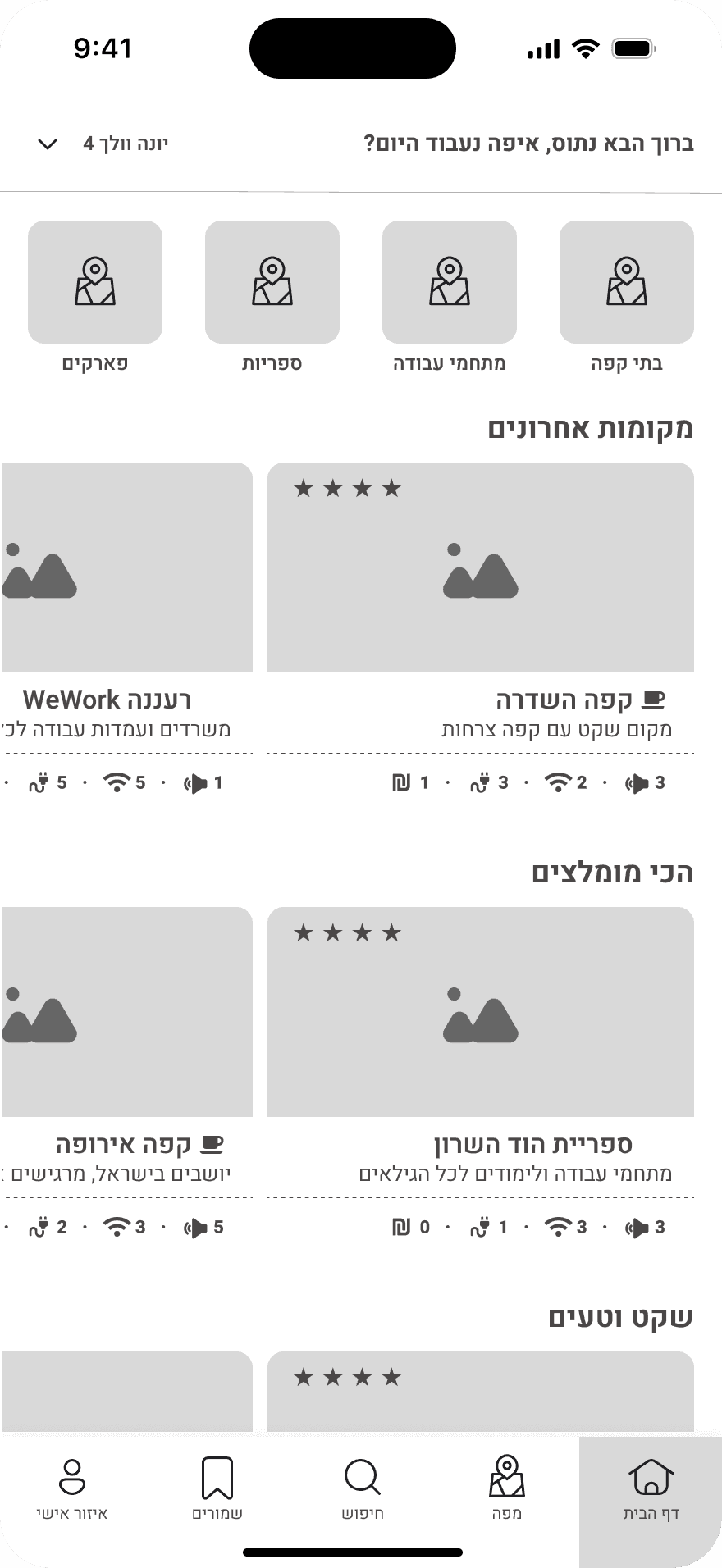
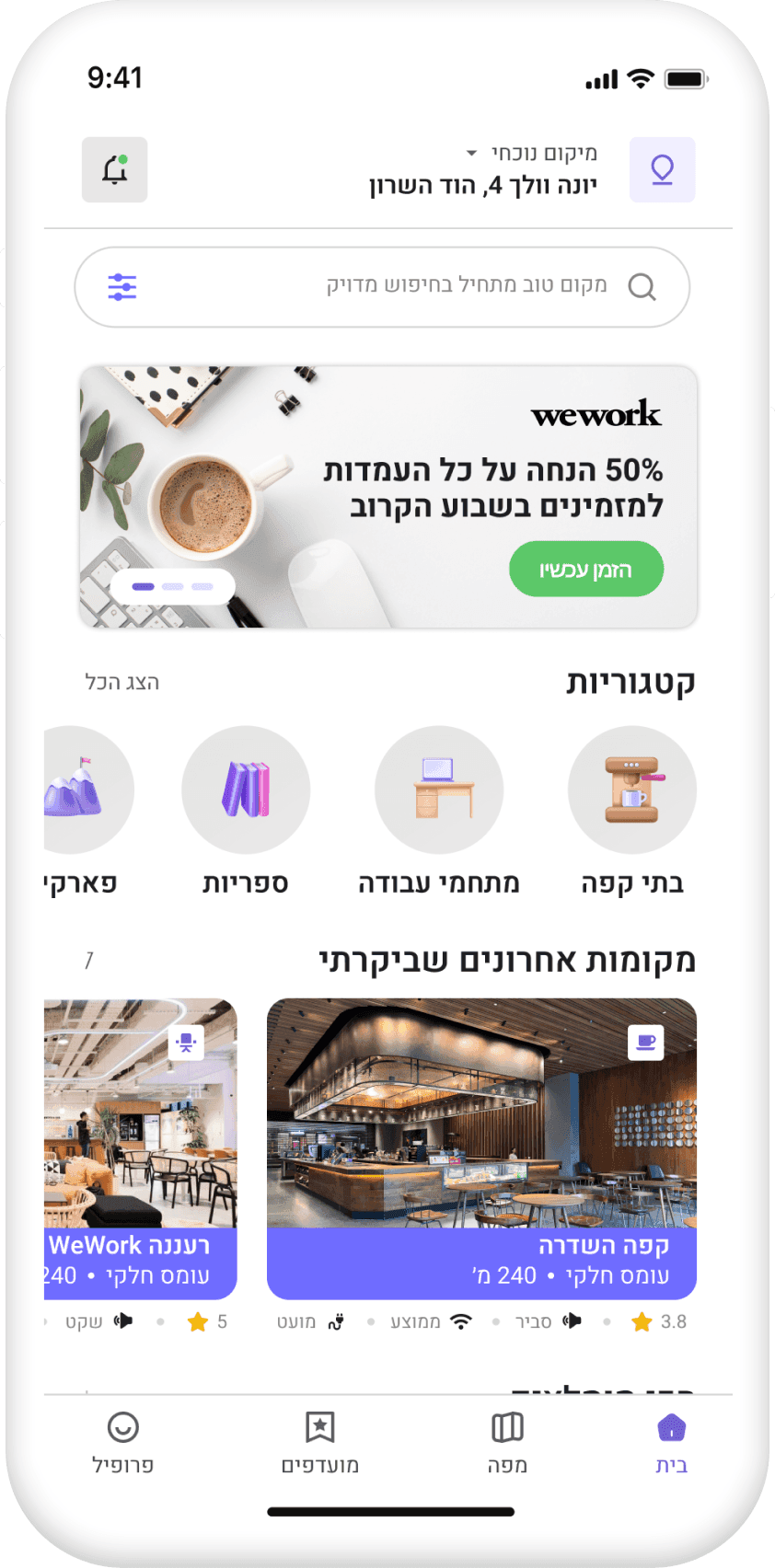
Quork home screen: a personalized list of nearby workspaces with photos, ratings and quick filters

1

Home

Personalized workspace discovery

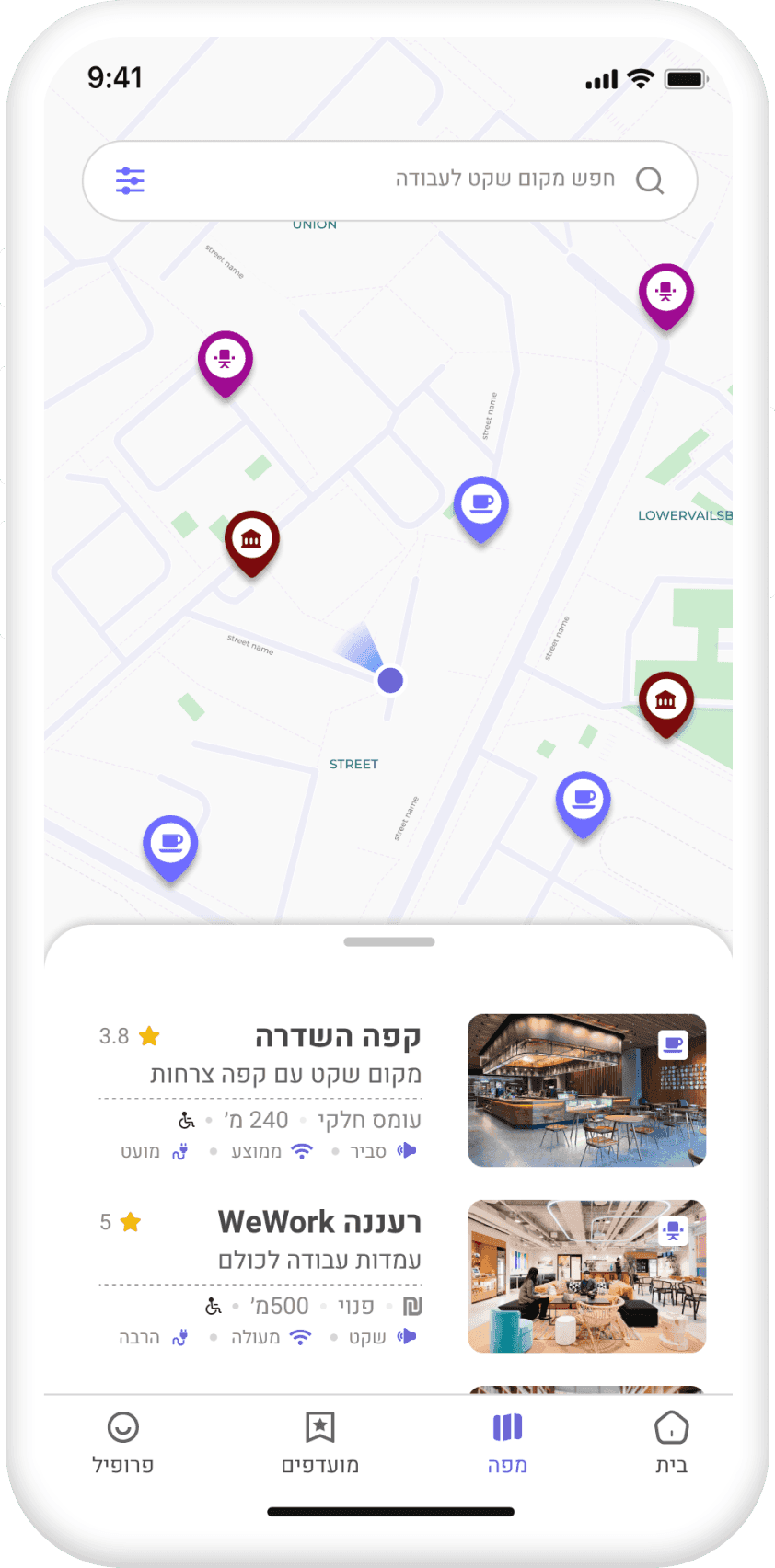
Quork map screen: workspace pins across the city with a results list underneath

2

Map discovery

Explore workspaces visually

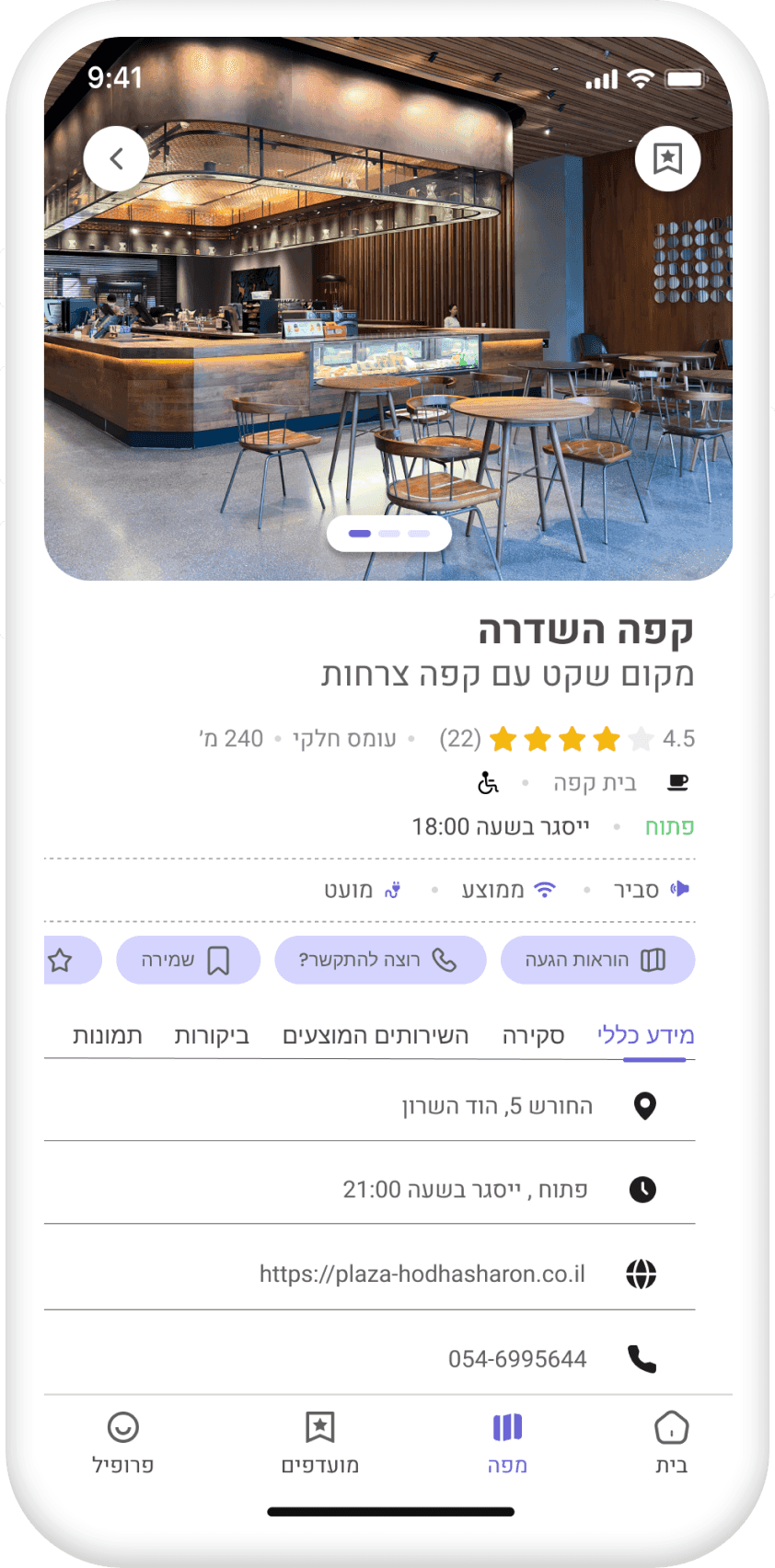
Quork workspace profile: photos, rating, opening hours, noise level, Wi-Fi, seating and outlet information

3

Workspace details

Know exactly what to expect

12 / KEY FEATURES

Everything you need before you go.

Everything you need before you go.

Everything you need before you go.

Smart filtering

Find locations that match your exact needs using filters such as atmosphere, Wi-Fi quality, noise level, amenities, accessibility and price.

Community reviews

Read authentic reviews from real visitors and understand what the workspace experience is actually like before you arrive.

Detailed workspace profiles

Browse comprehensive information including photos, services, opening hours, facilities, accessibility details and contact information.

Map-based discovery

Explore nearby workspaces visually and compare multiple options directly from the map interface.

13 / FINAL SCREENS

Designed to remove uncertainty from workspace discovery.

Designed to remove uncertainty from workspace discovery.

Designed to remove uncertainty from workspace discovery.

Every screen was crafted to help users make informed workspace decisions quickly and confidently. By combining detailed information, community feedback and intuitive navigation, Quork turns the search for a place to work into a simple and reliable experience.

Quork splash screen with the logo on brand green

Splash

Quork search screen with a location field and recent searches

Search

Quork filter sheet: noise level, place type, Wi-Fi strength and price

Filters

Quork home screen with nearby workspaces

Home

Quork map screen with workspace pins

Map

Quork workspace profile for Café Hasdera

Workspace profile

14 / SELF REFLECTION

Designing productivity for people who don’t always feel productive.

Designing productivity for people who don’t always feel productive.

Designing productivity for people who don’t always feel productive.

This project became personal very quickly. As someone who spent years working as a freelancer, I constantly found myself searching for quiet places to work — cafés that weren’t too noisy, libraries with available seating, or workspaces where I could actually focus for a few hours.

Most of the time, finding the right place meant opening multiple apps, reading scattered reviews, checking Wi-Fi comments, guessing how crowded the place might be, and sometimes arriving only to realize it simply didn’t fit my needs.

That frustration became the starting point for Quork. Rather than designing another “places app”, I wanted to create a tool that helps people feel more confident before leaving home — reducing uncertainty and making workspace discovery faster, calmer and more intentional.

What this project taught me

Nati’s LEGO-style avatar working at a laptop

Good productivity starts with comfort. People work differently. Some need silence, others need atmosphere, flexibility or social energy. Designing for productivity means designing for different human needs.

Small details build trust. Information like Wi-Fi quality, outlet availability, noise levels or seating comfort may seem small — but these details heavily influence decision-making and user confidence.

Reducing uncertainty is valuable UX. Sometimes the best user experience isn’t adding more features — it’s helping users feel more certain, prepared and comfortable before taking action.
Good design doesn’t only help people do things faster. Sometimes it helps them feel more comfortable doing them.

Quork app icon

Still scrolling? Good. There’s more.

Still scrolling? Good. There’s more.

Still scrolling? Good. There’s more.

Quork started with a freelancer’s daily frustration and became a tool for deciding where to work with confidence. Thanks for reading.

Designed & built by Nati Cohen — a product designer who builds like LEGO: modular, intentional, made to click into place.

Hopefully this website made your day at least 3% better.

© Nati Cohen, 2026